
Business Calendar 2 (open)
Please feel free to post your idea for our application. If your favorite feature is already mentioned, you are allowed to vote for it. A comment might be helpful, too.
Remember that your posts and votes just give us an idea of currently most-wanted features. An implementation can’t be guaranteed.
481 results found
-
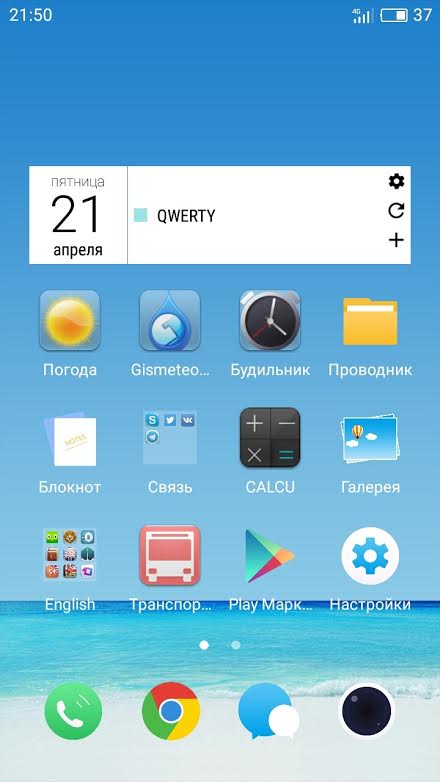
Centralizing tasks on the widget
I would like to be able to configure the placement of tasks in the center of the widget.
Screenshot
http://images.vfl.ru/ii/1493293180/c1e2d68a/17018524.jpg3 votes -
Agenda view timeline and photo style events
Hello
Is there any possibility that you can implement a timeline like Google Calendar? I mean in agenda view?
Plus: Paste a photo automatically when you set the place, taken from google maps?...
Thank you.
1 vote -
RTL: Floating Action Button
Floating Action Button:
Is it possible to make having it on the other side of the display, an option?1 vote -
Could do widget added option to display the date, instead of hours.
Widget "Day List" - Settings - General - Color box layout - add function Show color box with date
3 votes -
Improving transition between "move", "change", "create new"
when I work on a weekly view I can move an event with drag & drop but when I want to change it I need to go back, open and edit.
Proposal: on the same screen when I click on an event and keep
pressed goes to "move", if I click without holding down goes into "edit", if I click on an empty place goes to "create new"6 votes -
Once tasks are completed, if there were a follow up button to open calendar options
Once tasks are completed, if there were a follow up button to open calendar options
3 votes -
Improve the handling of decline meeting from calendar to distinguish between instance and series
When I go into my calendar and select a meeting and answer no to attending, I don't get a question whether this is for the series or the current instance. Thus, I have accidentally deleted a whole series when I intended to notify the meeting owner that I would not attend a given instance of a meeting series
5 votes -
Separate notifications (not grouped) for reminders/alerts
Currently, if you get two or more reminders/alerts, the notifications become grouped. This grouped notification needs to be expanded in order to see/action the individual reminders.
This makes it hard to get a quick glance of your current events/tasks by looking at the notifications. This is especially true if displaying the notifications on the lockscreen (i.e. using NiLS).
It would be great if there was an option to NOT group multiple notifications and instead keep them separate (i.e. the way Google Calendar does it). The notifications would still be actionable (i.e. snooze).
22 votes -
Fade recurrent events
As in online Google calendar, slightly fade events based on their recurrence.
I am surprised there is no such feature, I have weekly appointments and just from the shade, I see there is the same event, ie same meeting, don't have to read the title.1 vote -
Add option to the widget to ignore any item marked as Available (vs. Busy)
The widget has limited space. I want to see only items marked as Busy (i.e. ones that I will attend)
1 vote -
Title for private calendar's events
If in your Google calendar you add another Google calendar with the sharing setting as "see only free/busy", in the application you don't have a title but just an empty row.
It would be nice to see the free/busy information as in Google calendar or to set a title like "private".3 votes -
Single-Press Snooze
When you tap on a reminder you get a list of time options with radio buttons and an OK button at the bottom. I suggest making each of the time options a button so that you only have to press once.
4 votes -
Integration and/or Sync with Remember The Milk App
Integration and/or Sync tasks with Remember The Milk App
7 votes -
Different color shading for full day appointments in weekly view
To get a more easy visual split in the weekly view between full day events and time bound ones of a day - it would be great to have a slightly different color shading hard coded (just like the SPlanner). When you sync with exchange you have all appointment in the same color.
4 votes -
Termine der nächsten Tage im BC2 Tag Pro widget
Genau wie die Aufgaben oder das Wetter wünsche ich mir eine Möglichkeit die nächsten Termine auf der Seite des neuen BC2 Tag Pro Widget einzublenden. Damit wäre das Widget ein echter Allrounder. Ich würde mich über Unterstützung freuen.
1 vote -
Add a third option for delimiting two events when one ends and the next begins at the same time.
Add a third option for delimiting two events when one ends and the next begins at the same time. This would simply be a slightly more prominent horizontal line between the two. I find that either of the current options (side-by-side or offset) detracts from the visual flow and can gives somewhat misleading visual sense of priority when there actually isn't any temporal overlap.
2 votes -
Toll wäre für die wochenübersicht ein Kalender wo die Personenkonten in den Tagesspalten nebeneinander stehen
dass heißt das man auf einen Blick gleich sieht bei welcher Person noch Lücken sind. Damit könnte man auch Monteure bzw. Aussendienstmitarbeiter effektiver einsetzen und direkt sehen, wenn Kunden anrufen, wo es am besten passt!
31 votes -
1 vote
-
Thicken the horizontal the line between the group of multi-day events and the rest.
Thicken the horizontal the line between the group of events that span more than one day (above the daily events schedule) and the events that occur during single days.
1 vote -
Configurable size of box and single/multiline Layout in search view
When searching events because the size of the block and text is to big I can see only one event when the keyboard is showing.
Would be nice to have the size of the block and text configurable in this view to optimize the usage
5 votes
- Don't see your idea?